

Automation rules
A rule does something when something happens: add a follow-up task when a quote is sent, email the customer when an order is confirmed. The order of a sale doesn’t depend on them. They decide what happens around it, so the business can change them without a developer.
Rules are under System > Automations, for managers. They apply to every site, unless a rule has a Site condition.
Writing a rule
Section titled “Writing a rule”New automation rule has four parts.
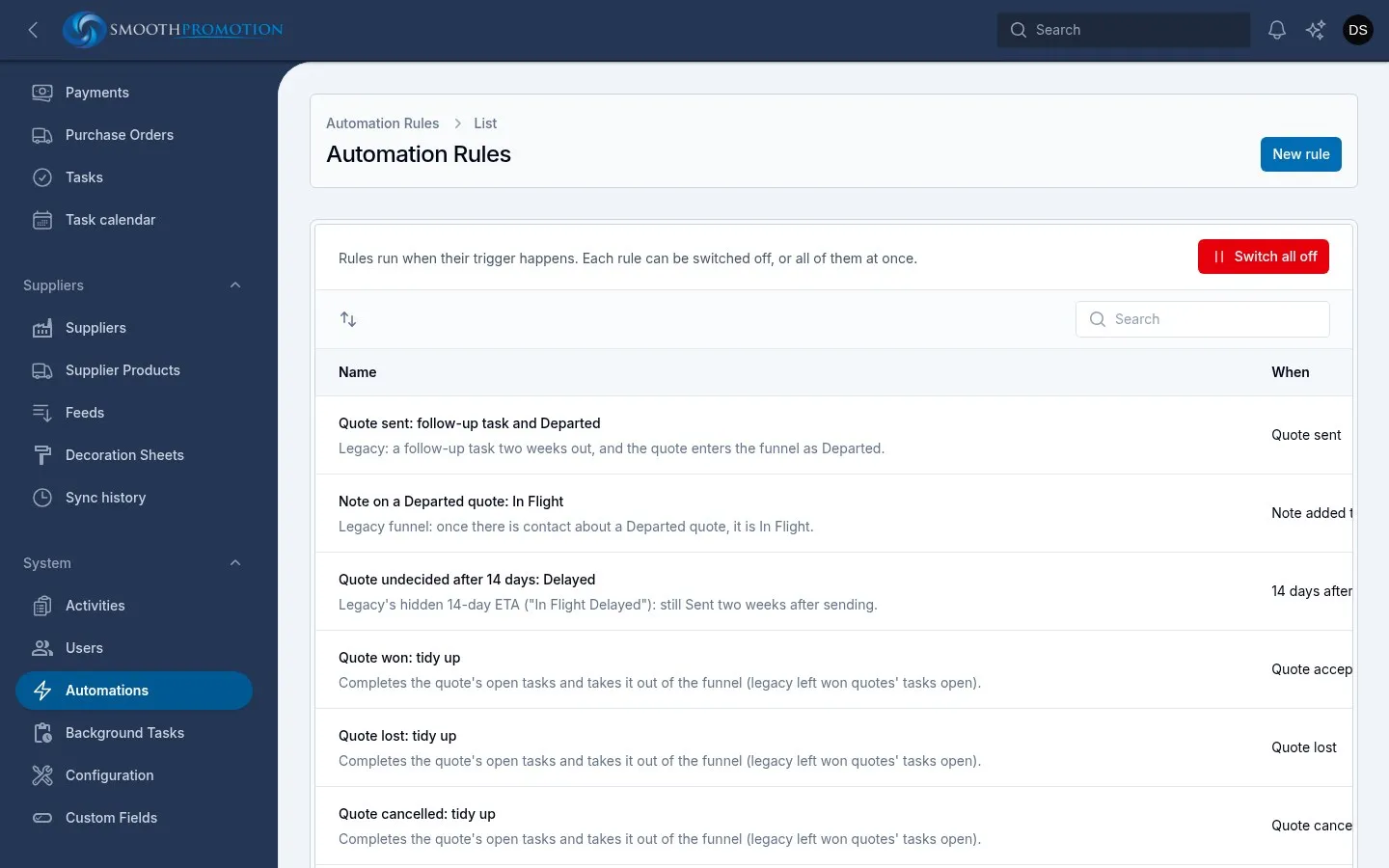
Rule: a Name, a Description and an On switch.
When: This happens picks the trigger, then Then says when to act:
- Straight away, or Wait some hours, days or weeks. If the trigger happens again for the same record during a wait, the wait starts over.
- Afterwards can repeat every few hours, days or weeks, up to a limit of At most how many more times. Repeats stop as soon as the conditions no longer hold, which is how a payment reminder stops once the invoice is paid.
If: conditions on the record. All must hold, and with none the rule always runs. They are checked when the rule actually runs, after any wait, so they see the record as it is then.
Then: one or more actions, in order.
Changing the trigger to another record type clears the conditions and actions, as they belong to the type.
Triggers
Section titled “Triggers”Triggers are grouped by the record the rule is about.
| Record | Triggers |
|---|---|
| Quote | Quote drafted, Quote sent, Quote emailed (every send), Quote accepted, Quote lost, Quote revised, Quote cancelled, Artwork proof sent, Artwork proof changes asked for, Artwork proof approved |
| Sales order | Order drafted, Order confirmed, Order put on hold, Order taken off hold, Order in production (first purchase order sent), Order partially shipped (first shipment, more to come), Order shipped (everything has left the suppliers), Order completed (shipped and paid), Order delivered (the last of it arrived), Order cancelled, Purchase order sent, Purchase order acknowledged, Purchase order cancelled, Shipment recorded on a purchase order, Artwork proof sent, Artwork proof changes asked for, Artwork proof approved |
| Invoice | Invoice issued, Invoice emailed (every send), Invoice overdue, Invoice voided, Payment recorded (every payment), Invoice paid in full, Refund recorded (every refund), Credit note issued, Credit note voided |
| Customer | Rep changed, Quote request submitted |
Each also has its own Note added to…, Task added to… and Task done on…. Quotes and customers also have Tag put on… and Tag taken off….
Quote sent fires each time a draft moves to Sent, by email or marked by hand, so again after a revision. Quote emailed (every send) fires on each email, including Send again.
Purchase orders aren’t records of their own here, so their moments are rules on the sales order.
Conditions
Section titled “Conditions”| Condition | Quote | Sales order | Invoice | Customer |
|---|---|---|---|---|
| Site | Yes | Yes | Yes | |
| Status | Yes | Yes | Yes | |
| Total | Yes | Yes | Yes | |
| Rep | Yes | Yes | Yes | Yes |
| Customer tier (Tier on a customer) | Yes | Yes | Yes | Yes |
| Open tasks | Yes | Yes | Yes | Yes |
| Tags | Yes | Yes | ||
| Lost reason | Yes | |||
| Firm in-hands date, Delivered, Made from a quote | Yes | |||
| Paid, Overdue, Reminders paused, Balance due, Payment term | Yes |
A value from a list uses is one of or is not one of. A list that can hold several, such as tags, uses has any of or has none of. A number uses is at least or is less than. Triggers about a tag or a task can also check The tag or The task type.
Actions
Section titled “Actions”| Action | Works on | What it does |
|---|---|---|
| Create task | All | Adds a task on the record: title, type, priority, who to assign it to, and when it is due. Only if no open task of this type on the record avoids doubles |
| Complete open tasks | All | Finishes the record’s open tasks, of one type or any |
| Add tag, Remove tag | Quotes, customers | Puts a tag on or takes it off |
| Notify staff | All | Tells a rep, a named person, everyone with a role or an email address, in the admin, by email or both. On a sales order it can also go to the site’s production email |
| Email the customer | All | Sends an email template, from the rep or a fixed address, optionally with a Bcc to the rep |
Email the customer sends nothing if the customer is marked Do not contact or has no email address, or if the template is missing or switched off. The rule still counts as having run, and its log says why nothing went.
Entries the actions put on a timeline name the rule in place of a person.
The starting rules
Section titled “The starting rules”Your list may hold a starting set of rules, all switched off until the business reviews them. Read each one before switching it on.
| Rule | What it does |
|---|---|
| Quote sent: follow-up task and Departed | A follow-up task in 14 days, and the tag Departed |
| Note on a Departed quote: In Flight | Swaps the tag when someone adds a note |
| Quote undecided after 14 days: Delayed | If still sent after 14 days: the tag Delayed, and tells the rep |
| Quote won: tidy up, Quote lost: tidy up, Quote cancelled: tidy up | Finishes open tasks and takes off those three tags |
| Quote follow-up email (2 days) | Emails the customer if the quote is still undecided |
| Order confirmed: confirmation email | Emails the customer |
| Order confirmed: send to production | Emails the site’s production email |
| Order shipped: review request (7 days) | Emails the customer, with the site’s Review link. Set that first |
| Invoice emailed: anniversary follow-up | A task for the customer’s rep in 49 weeks |
| Invoice overdue: payment reminder | Emails the customer and tells the rep, then every 7 days up to 3 more times, while unpaid and not paused |
Checking what a rule did
Section titled “Checking what a rule did”Open a rule to see its tabs:
- Runs shows each run, newest first, with Ran, Skipped (a condition didn’t hold, and which) or Failed, and what it did. A failed run undoes everything it did, and is tried again up to three times in all.
- Waiting shows runs still to come for a rule with a wait or repeats, with when each is due. Cancel stops that run and its repeats, unless the trigger happens again.
The list has the number of runs, an On switch per rule, and each rule’s history. See the activity log. How long the run log is kept is under Housekeeping in Settings.
Rules on the same trigger run in the list’s order, so drag them to change it.
Switching everything off
Section titled “Switching everything off”Switch all off stops every rule at once. Things that happen meanwhile aren’t caught up later, and waiting runs that fall due while it is off are dropped. Switch all on starts rules again from then on.